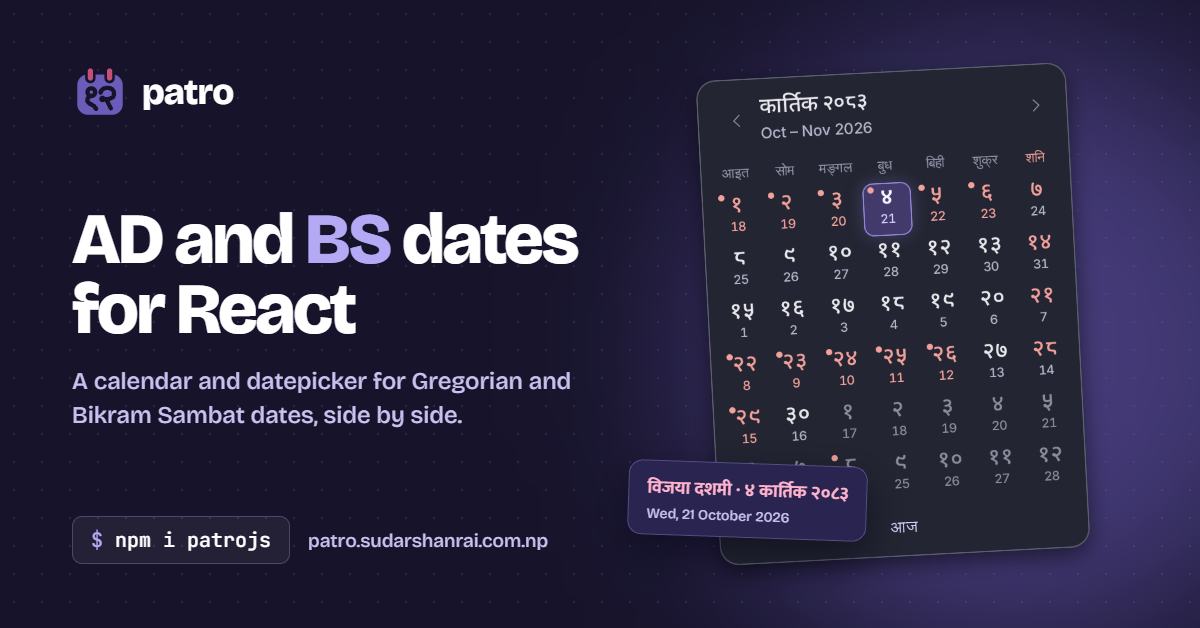
If you build software for Nepal, you work with two calendars. Government forms, citizenship certificates, school records and payslips use Bikram Sambat (BS). APIs, databases and the rest of the world use the Gregorian calendar (AD). Users switch between them all the time, and they expect your app to keep up.
Most React date pickers only know AD. So I built patrojs, a React calendar and datepicker that shows both calendars at once.
npm install patrojs
📖 Docs and live examples: patro.sudarshanrai.com.np
⭐ GitHub: github.com/mrsudarshanrai/patro
Why I made it
The first commit is from October 2022. Back then I needed a BS date picker for a React project, and the options were limited. Some only showed BS, some only converted dates, and many looked like they came from a different decade or broke as soon as you put them inside a modal.
What I wanted was simple to describe:
- Both dates on every day. When someone picks "Kartik 12", they should also see that it's 29 October, so nobody has to convert in their head.
- A real form control. It should work with keyboard and screen readers, native forms, react-hook-form and Formik, and inside dialogs.
- Correct dates. A date picker that is off by one day is worse than none, especially for payroll, leave or legal forms.
The early 0.0.x versions were test builds. Version 1.0 is a full rewrite with those goals in mind, released in October 2026.
What it solves
Two calendars in one grid
Choose which calendar to show, and every day also shows its date in the other one:
import { Datepicker } from 'patrojs';
import 'patrojs/style.css';

<Datepicker
  calendar='BS'
  locale='ne'
  numerals='devanagari'
  label='जन्म मिति'
  onChange={(value) => console.log(value?.bs, value?.ad)}
/>;
onChange gives you both forms of the date, so you can store AD and show BS, or the other way round:
{ date: Date, ad: '2026-10-29', bs: '2083-07-12' }
Month names, weekdays, digits and even screen-reader labels follow the locale, so a page can be entirely in Nepali.
Ranges, holidays and working days
Leave requests and bookings need date ranges with rules. patrojs supports mode='range' with minDays, maxDays and excludeDisabled, and you can mark holidays with your own data:
<Datepicker
  mode='range'
  calendar='BS'
  weekendDays={[6]} // Saturday, as Nepali calendars do
  dayClassName={({ bs }) => (holidays.has(bs) ? 'holiday' : undefined)}
  dayLabel={({ bs }) => holidays.get(bs)} // read out by screen readers
  onChange={({ start, end }) => setRange({ start, end })}
/>
The docs include real-world examples: a leave application in Nepali, a booking form, a registration form and a date converter.
Conversion without a server
ad2Bs and bs2Ad work offline, with no API call. They also work on the server, through patrojs/utils:
import { ad2Bs, bs2Ad } from 'patrojs/utils';

ad2Bs('2022-10-24'); // '2079-07-07'
bs2Ad('२०७९-०७-०७'); // '2022-10-24'
How I made it
BS dates come from a table, not a formula
The AD calendar has a simple leap-year rule. BS doesn't. Its months follow the Sun's movement through the zodiac, so they are 29 to 32 days long, and the pattern changes every year. The official dates are worked out by calendar experts and published in the panchang.
So patrojs keeps a table of month lengths for every BS year from 1978 to 2099, anchored at a known date: BS 1978-01-01 is 13 April 1921. Converting a date is just counting days from that anchor. The table is cross-checked against the nepali-datetime package and nepalipatro.com, and a test converts every supported day there and back.
The off-by-one-day trap
The trickiest bug in date code is a date that is one day off for some users. In JavaScript, new Date('2026-10-29') is read as UTC midnight, which is still 28 October for anyone west of UTC. Mixing UTC and local time like this quietly shifts dates.
patrojs does all conversion arithmetic in UTC, and the test suite runs again in five different time zones to catch any slip.
One grid for both calendars
Instead of separate code for each calendar, the month grid walks through AD days from the Sunday before the month starts to the end of its last week. Each cell knows its AD date, its BS date and its state (today, selected, disabled), so the same grid works for BS and AD. Only the labels change.
Server rendering without hydration errors
"Today" on the server (often UTC) can be a different day from today for a visitor in Nepal. If the server renders today's date, React complains about a hydration mismatch. patrojs reads today only in the browser, using useSyncExternalStore. The server renders the calendar frame, the browser fills in the month, and it updates at midnight too.
Accessibility and real-world testing
The calendar follows the WAI-ARIA date picker pattern. Arrow keys move by day and week, Page Up and Page Down change the month, the input works as a combobox, and colours meet WCAG AA contrast. Tab and Escape stay inside the picker when it's used in a dialog, including native, Radix and Headless UI dialogs.
The project is checked by:
- unit and component tests with Jest and Testing Library
- Playwright end-to-end tests in Chromium, Firefox and WebKit
- package checks that install the published package into ESM, CommonJS, SSR and TypeScript projects, with React 18 and 19
- a size budget: the whole library is about 23 kB gzipped, with one runtime dependency (
@floating-ui/dom, for popover positioning)
What's next
- Dates after 2099 BS. Official BS dates aren't published that far ahead, but long-term contracts need them, so I'm looking at estimated dates that are clearly marked as estimates.
- More BS helpers, such as working-day calculations and fiscal years.
Try it and contribute
patrojs is free and open source under the MIT licence. Everyone is welcome to contribute or open an issue, whether it's a bug, a feature idea or a docs fix.
- Docs: patro.sudarshanrai.com.np
- GitHub: github.com/mrsudarshanrai/patro
- npm: npmjs.com/package/patrojs
If it saves you some time, a ⭐ on GitHub helps other Nepali developers find it.