Homelab Server
A repurposed ASUS GL551J gaming laptop running headless Ubuntu Server, hosting media streaming, photo backups, Network-wide ads and tracker blocking and a production API — fully containerized and reachable without opening a single port on the router.
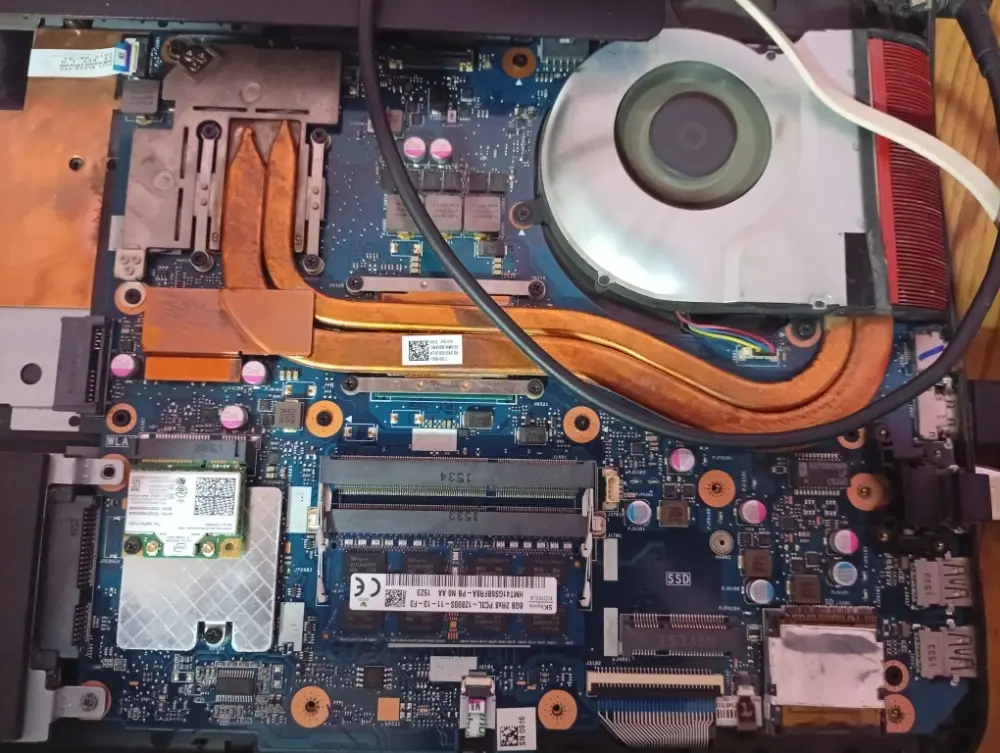
The Build
Instead of retiring an aging ASUS GL551J, I stripped it down to bare hardware and rebuilt it as a headless Ubuntu Server. It now runs my entire self-hosted stack — media streaming, photo backups, network-wide ad and tracker blocking via Pi-hole, and the REST API behind this portfolio — sandboxed in Docker, with the laptop's own battery doubling as a built-in UPS. Public-facing services are exposed through an outbound-only Cloudflare Tunnel, while direct access to the server itself — SSH, and bandwidth-heavy uses like streaming from Jellyfin — goes over a Tailscale mesh network instead, since the Cloudflare Tunnel isn't well suited to sustained high-bandwidth media traffic.
Hardware
Diagram

Hosted Services
Jellyfin
Media streaming server with GPU-accelerated hardware transcoding.
Pi-hole
Network-wide DNS sinkhole for ad and tracker blocking.
Immich
Self-hosted photo & video backup with CUDA-accelerated machine learning.
Portfolio API
Custom Node.js / NestJS REST API backing this website.
PostgreSQL
Primary relational datastore, sandboxed on an isolated network.
Redis
In-memory caching layer sitting in front of the API.
Beszel
Lightweight system resource and container health monitoring.
Security & Ingress
Zero-Port-Forward Ingress
There is no inbound port open on the router. cloudflared runs inside the homelab and opens an outbound connection to the Cloudflare edge, which proxies traffic back through that same tunnel to the right internal service. The isolated Docker bridge network holding PostgreSQL, Redis, and the NestJS backend has no published ports at all — those services are unreachable from outside the Docker host, tunnel included.
Engineering Highlights
Battery as a Natural UPS
Left the laptop's internal battery installed rather than stripping it out — it rides through brief power outages and brownouts like a built-in UPS, with zero extra hardware.
GPU-Accelerated Workloads
Configured nvidia-container-toolkit to pass the GTX 960M through to Docker, giving Jellyfin hardware transcoding and Immich CUDA-accelerated ML for face and object detection.
Zero-Port-Forward Ingress
Every public-facing service is reached only through an outbound Cloudflare Tunnel (cloudflared) — the router has no forwarded ports, so the server is invisible to internet-wide port scans.
Network-Wide Ad Blocking
Pi-hole sits as the network's DNS resolver, blocking ads and trackers at the DNS level for every device on the network — no per-device extensions or browser plugins needed.
Tailscale for Direct, High-Bandwidth Access
The Cloudflare Tunnel handles public-facing services, but it isn't a good fit for sustained high-bandwidth traffic like media streaming. For SSH and for streaming from Jellyfin while away from home, I connect over Tailscale instead — a WireGuard-based mesh VPN that puts my devices directly on the homelab's tailnet, without routing that traffic through the tunnel.
Isolated Data Layer
PostgreSQL, Redis, and the NestJS backend run on their own Docker bridge network with no published ports at all, reachable only from inside that network.